|
Hi
[FIRST.NAME],
 Welcome to the iolo affiliate newsletter for
March. In the
last edition of the affiliate newsletter
we
introduced
you to iolo's Whole Home Licensing™ which allows your customers
to use System Mechanic on their
ALL
their home PCs [no matter how many they own]. In this edition
of the affiliate newsletter we want to let you know
about iolo's ActiveCare®, and why you need to promote
this technology to your customers. Welcome to the iolo affiliate newsletter for
March. In the
last edition of the affiliate newsletter
we
introduced
you to iolo's Whole Home Licensing™ which allows your customers
to use System Mechanic on their
ALL
their home PCs [no matter how many they own]. In this edition
of the affiliate newsletter we want to let you know
about iolo's ActiveCare®, and why you need to promote
this technology to your customers.
Before we get
started though, I've got some great news for you.
Through to
June 30 you can offer
your customers $20 off System Mechanic 10 through our
'spring clean your PC' coupon campaign. Check out the
coupon below, along with the HTML code to add it
to your website/blog:
N.B. Feel free to use the copy/graphics below on your website/blog.
PC care that works around you
 Imagine
if every time you parked and left your car, a team of
auto detailers and repair technicians suddenly appeared
to clean and service it: washing and waxing, topping the
fuel, checking the oil, adjusting tire pressure,
cleaning battery connections, doing all the maintenance
that keeps a vehicle running at its best. And when you
came back, the crew instantly stopped their work,
leaving you free to drive off in your newly tuned
vehicle. Imagine
if every time you parked and left your car, a team of
auto detailers and repair technicians suddenly appeared
to clean and service it: washing and waxing, topping the
fuel, checking the oil, adjusting tire pressure,
cleaning battery connections, doing all the maintenance
that keeps a vehicle running at its best. And when you
came back, the crew instantly stopped their work,
leaving you free to drive off in your newly tuned
vehicle.
That's exactly how System Mechanic's patented ActiveCare®
maintains your PC. ActiveCare® silently checks and
repairs your computer while you're away: diagnosing,
tuning, fixing, and cleaning as needed. And then the
instant you return, ActiveCare® stops – you have a faster
and healthier PC, and no maintenance activities are
interfering in your use of the computer.
One of the many industry-first technical innovations
included in System Mechanic, ActiveCare® automatically
optimizes your PC whenever you're not using it—so it
will be ready to go when you are!
Why ActiveCare®?
Some software programs will schedule PC maintenance to
occur at specific intervals, such as every week. But
with the scheduled approach, errors that arise between
intervals go unrepaired and maintenance tasks can start
at the most inconvenient times – slowing everything down
right when you're in the middle of your work.
|
System Mechanic is the only product with the patented
technology that
keeps your PC tuned up on a regular basis without
slowing you down. The patented
ActiveCare® technology is
superior to the schedulers found in other programs,
because it only runs
the fixes that are needed, and it only runs
when your computer isn't being used. The repairs your PC
needs are completed in real-time, so you avoid annoying
and needless interruptions. |
How ActiveCare® Works
While your PC is on but not in use, ActiveCare® monitors
key indicators of performance and then automatically
runs the repairs your computer needs. Some key features:
-
Background processing. ActiveCare® works silently in
the background, only when your PC is not being used. And if
you return to your computer during processing, ActiveCare®
immediately closes, letting you work without any
interference.
-
Patented technology. Technically advanced performance
algorithms ensure that repairs and optimizations are only
run when needed, while ZeroRAM™ technology ensures minimal
memory is used for processing.
-
Fully configurable. You have total control over which
automated actions ActiveCare® runs.
Using ActiveCare
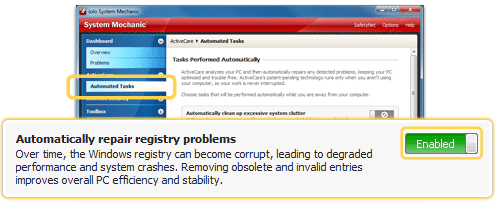
You control the automated
actions that
ActiveCare® runs by making selections from
the Automated Tasks pane.
1. Under
ActiveCare®
on the navigation bar, click Automated
Tasks.
2. Click the toggle button next to a task to
Enable
or Disable
the automated repair.
With
ActiveCare®, you can automatically:
 |
Clean and repair the registry
by removing obsolete and invalid references |
|
|
Automatically
defragment and compact the registry
on an as-needed basis |
|
|
Streamline Windows startup
by eliminating unneeded startup commands |
|
|
Clean out unneeded files
when system clutter becomes excessive |
|
|
Adapt internet settings
to boost internet speed and stability |
|
|
Repair security vulnerabilities
in operating systems and browsers |
|
|
Detect and
repair hard drive errors |
|
|
Defragment hard drives
when drives become highly fragmented |
|
|
Defragment the system's memory
when memory is low |
|
|
Detect and
repair broken shortcuts |
|
|
Automatically
back up the registry
on a recurrent basis |
Additional configurations
allow you to fully customize when
ActiveCare® runs – you
can control
ActiveCare® processing based on battery power
usage, CPU usage, gaming modes, and more. To access
these settings, click Configure from the Automated Tasks
pane, and then click Edit Advanced Options.
The New York Times Loves
System Mechanic 10!
In
case you missed it, check out a glowing review of System
Mechanic from the
New York Times.
" I
saw some very noticeable improvements after running System
Mechanic. For instance, boot-up took 1 minute, 57 seconds before
I ran System Mechanic, and only 58 seconds after. A restart was
2 minutes, 19 seconds before, and 1 minute 40 seconds after.
Time to load a graphics–intensive Web site like CNET was 3.8
seconds before and 2.1 seconds after. Firefox launched in 9
seconds before and 6 seconds after.
The software also enabled the laptop to more efficiently use its
CPU while displaying video. For instance, CPU usage maxed out at
93 percent when launching Hulu.com before running System
Mechanic but only 58 percent after. More efficient CPU usage
will enable you to more smoothly run multiple applications."
iolo also received an outstanding review on System Mechanic 10
from
PC
World.
" I
tested Iolo System Mechanic 10's ability to whip a PC back into
shape by performing three tests—running the Geekbench system
performance tool, measuring boot times, and transferring a 1.1GB
folder of mixed media to external storage—before and after
running the software to compare the computer's potency. Each
test was run three times and averaged. Before AVG PC Tuneup 2011
scrubbed the system, the 2-GHz Intel Core i7 X990 Style-Note
notebook with 4GB of RAM, and an 80GB Intel SSD drive achieved a
5,903 Geekbench score, booted in 50.3 seconds, and transferred
the 1.1GB folder in 40.5 seconds.
After using tested Iolo System Mechanic 10, the system saw the
most improved performance of all the tune-up utilities tested:
The GeekBench score rose to 6033 (better than AVG PC Tuneup
2011's 6009, Comodo System Cleaner's 5,991, and PC Tools
Performance Toolkit 2011's 5969); the boot time decreased to a
just 42 seconds (swifter than AVG PC Tuneup 2011's 43.1, PC
Tools Performance Toolkit 2011's 46 seconds, and Comodo System
Cleaner's 48.7 seconds). The file transfer speed dropped to 40.2
seconds (a few seconds faster than AVG PC Tuneup 2011's 43.3
second, and Comodo System Cleaner's 44.2 seconds, but slower
than PC Tools Performance Toolkit 2011's 39.3 seconds).
As with AVG PC Tuneup 2011, the overall system performance was
incredibly fast and snappy—windows and menus opened in a blink."
iolo has received lots of press on our products. Check out a
selection of recent reviews
here. [You
should consider using some of these reviews to promote our
products].
iolo's Products Are Available
Through A Full Product Data Feed
Do you offer price shopping
comparison tools to your consumers? Would you like to
receive a data feed of iolo's products? If so, then
please
contact me.
Product Bundle: System Mechanic 10 PLUS Search and
Recover. Only $39.95 [Save $49.95!]
We're pleased to announce an exclusive offer just for
affiliates. You can now offer your customers a bundle of the
following products:
1.
System Mechanic 10. [Regular price: $49.95]
Everything you need to fix and speed Up Your PC.
2.
Search and Recover. [Regular price: $39.95]
Rescues accidentally deleted files, photos, MP3's & more.
Great news; through the link below your customer's can purchase
both titles for only $39.95! This means that they'll save a
massive $49.95.
Check out a selection of banners for this
campaign you should consider adding to your website/blog:
There are lots more banner sizes available
for this campaign through Linkshare. If you have any
size requests, or feedback, for the banners above please
email me.
Linkshare Trackable Video Files
Would you like to add high quality videos
that promote iolo's products to your website [in less than 2
minutes] and track sales through Linkshare? Now you can! Check
out the links below:
System Mechanic Promotional Video
System Mechanic Radio Ad
Please note: Do not enter a link
in the box on the page i.e. where you see "Step 1. Enter your
unique affiliate ID code here:". You need to provide your unique
Linkshare ID code that's contained within your affiliate links.
Your Linkshare ID code is: [SITE.CODE]
Calling All Email Marketers!
If you have a list that you think might be interested in iolo's
software I'd like to speak with you! We have a lot of [tested
and proven] messages that can be used by email marketers through
their lists. Email me
for more details.
What Customers Are Saying...

Here're a handful of reasons why you should work with us:
- High
Conversion Rate. We convert your traffic! iolo's
respected brand, high quality software, low price point and
great value results in a conversion rate that averages 2%
across all earning affiliates. [Our top affiliates convert
at over 5%.]
-
High Commission Rate: We'll pay you 30% on each and
every sale you make through the iolo affiliate program.
- Trusted Program Management. iolo's affiliate
program is run through the Linkshare network and
professionally managed by
AMWSO.
- 45 Day Cookie. The customers you refer to us don't
have to buy right away for you to profit. We have a 90 day
tracking cookie so even if they return to our website and
purchase weeks after visiting through your site we'll still
pay you.
- Monthly Newsletter Support. As an iolo affiliate
you'll receive an informative monthly email that'll give you
the tools/resources to better market iolo's software. We'll
also keep you updated on; affiliate competitions, activation
bonuses, program updates etc.
- Keyword Support for CPC Campaigns. iolo offers
affiliates full support for paid search campaigns.
Email me for a full keyword list.
- Parasite Free Program. As with all AMWSO managed
programs the iolo affiliate program is parasite free. And
always will be.
- Free Content. iolo offers affiliates high quality
content that can be used for Web and Email Marketing.
Email me for more information.
Have a great day!
James D. Nardell
iolo Affiliate Management Team
Email: James.Nardell@iolo.com
Phone: (805) 624-5669 (805) 624-5669
IM -
JamesNardell@hotmail.com [MSN Messenger]
IM -
JamesNardell@gmail.com [Google Talk]
http://www.iolo.com |
iolo Website
http://www.amwso.com/iolo.php | Affiliate Support
Website
|